
Database Color Thresholds
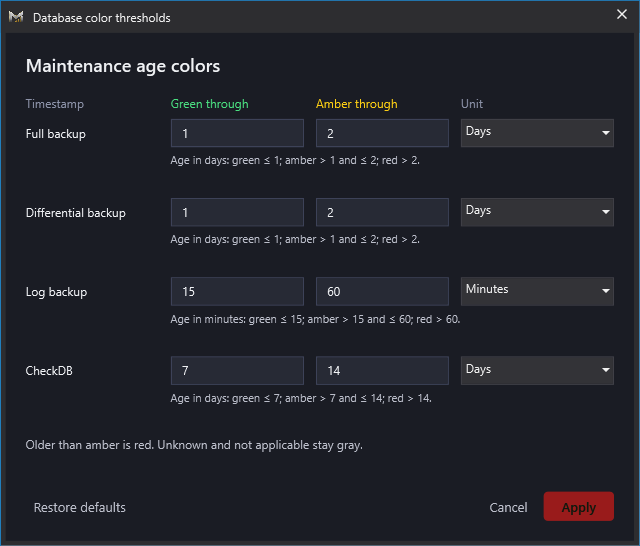
Use the small gear beside the database grid's column chooser and refresh icon. Settings are shared by Server Detail and database Search, including historical views.
Set Green through and Amber through independently for Full, Differential, Log, and CheckDB timestamps. Select Minutes, Hours, or Days for each pair. Changing units preserves the duration. Dates older than amber are red; unknown/not-applicable dates stay gray and future dates remain amber.
Each row shows its exact comparisons and updates as you edit: green: age <= green limit; amber: green limit < age <= amber limit; red: age > amber limit. Both upper boundaries are inclusive. For example, with 1 and 2 days, exactly 1 day is green and exactly 2 days is amber. Age means elapsed time since the recorded timestamp, not the timestamp's calendar date.
Both limits must be positive; amber must be greater than green. Invalid values are marked inline and nothing is saved until every row is valid. Apply saves to DatabaseProtectionThresholds in the existing UserConfig.json and immediately updates open database grids without recollecting. Cancel discards edits. Restore defaults resets the draft only; choose Apply to save it.
Defaults: Full and Differential green through 24 hours / amber through 48 hours; Log 15 / 60 minutes; CheckDB 7 / 14 days. For example, Log green through 30 minutes and amber through 2 hours makes a 45-minute-old log backup amber and a 3-hour-old one red.
These are display preferences, not a validated backup SLA or integrity result. Recovery-model colors identify categories and are not age thresholds. Historical ages still use the selected server cutoff, with your current display thresholds.
The default grid keeps Database, Tags, decorator icons, Storage, Files & I/O, Backups, CheckDB, Recovery, and State. Search also shows Server. Owner, Compatibility, Created, scope metadata, and raw numeric/date fields remain available through the column chooser but start hidden.
Documentation revision: 9E465106339FAEF3